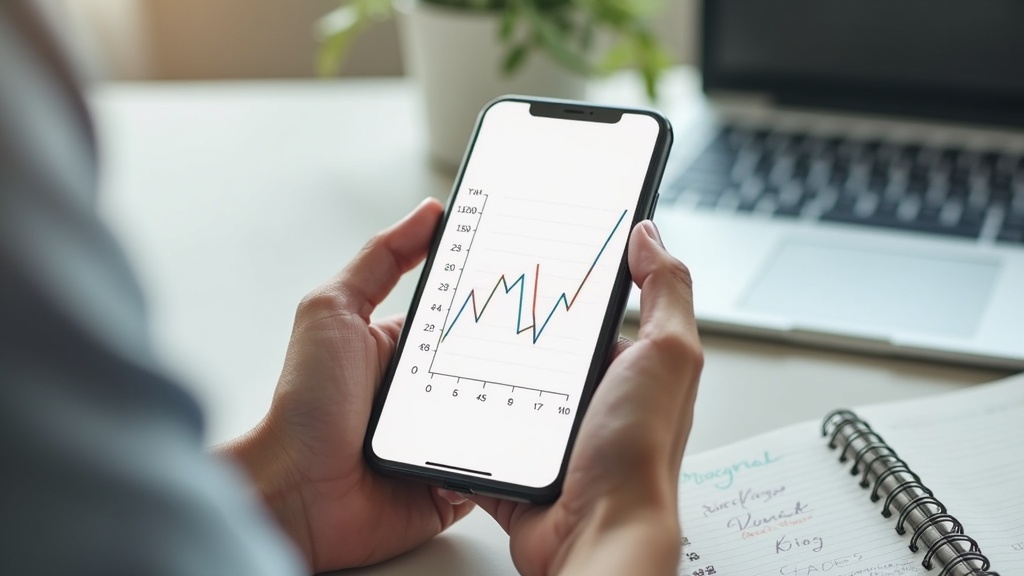
Price-tracking tools work by quietly logging a product’s listed price over time, storing that history in a database, and then showing you a chart or sending an alert when the price drops below a level you set or below its recent average. Most pull data through automated scans of retailer pages (or partner data feeds) on a regular schedule, not in real time. Understanding that lag — and what the tools can’t see, like your personal shopping cart or a targeted coupon — is the key to using them well.
What a price-tracking tool actually does
At its core, a price tracker is a monitoring system. You give it a product page or an item you’re watching, and it checks that listing on a recurring basis — sometimes hourly, sometimes once a day — and records the price it finds. Over weeks or months, that creates a price history: a simple line showing how the number has moved up and down. Some tools layer on alerts, so you get a notification when the price crosses a threshold you picked, or when it hits the lowest point the tool has seen in its own tracking window.
That last phrase matters: “lowest ever” almost always means lowest ever *that the tool has recorded*, not lowest ever in the history of the product. If a tracker only started watching an item six months ago, it has no idea what the price did the year before that.
Where the data actually comes from
Browser extensions typically work a little differently than standalone tracking websites. An extension usually watches pages you personally visit and can also tap into a shared database built from millions of other users’ browsing, which is how it can show you a price history chart for a page you’ve never visited before. Standalone tracking sites and apps, by contrast, usually run their own automated checks on a defined list of retailer pages, refreshing prices at set intervals rather than waiting for a person to load the page.
Either way, the underlying process is the same: fetch the page, pull out the price, timestamp it, store it. The tools that also try to track stock status, size, or color variations need more sophisticated scraping, which is one reason those details are less reliable than the plain price history.
Why the data isn’t instant
Retailers change prices constantly, sometimes several times a day for the same item, especially around major sales windows. A tracker that only checks once every 24 hours will simply miss short-lived price movements — an evening flash change that reverses by morning won’t show up cleanly in the history. That’s part of why relying purely on an automated tool, without ever comparing listings yourself, can still leave money on the table; the guide on how to comparison shop without wasting hours covers how to blend quick manual checks with tools like these efficiently.
What the charts can and can’t tell you
A price history chart is genuinely useful for answering one narrow question: is this price high, low, or about average compared to what this specific listing has shown recently? It’s much less useful for answering broader questions like “is this a good product” or “will it get cheaper next month,” because it has no awareness of upcoming promotions, seasonal patterns, or new model releases.
That’s where general buying-pattern knowledge still beats a chart. Categories like televisions and laptops tend to follow fairly predictable seasonal rhythms tied to model refreshes and major shopping events — patterns covered in more depth in guides like Best Time to Buy a TV and the Best Month to Buy a New Laptop breakdown. A price tracker can confirm that a current listing is at a real low, but it can’t tell you that appliances typically get marked down around certain holiday weekends, the way a seasonal buying guide can; for that kind of context the Deal Timing & Sales Calendars hub is a better starting point than any chart.
Browser extensions vs. standalone sites vs. doing it yourself
There are basically three approaches, each with real trade-offs.
- Browser extensions: Convenient because they work automatically as you browse and often show a price history pop-up right on the product page. The trade-off is that they typically only cover a handful of larger retailers well, and installing an extension means giving it permission to see the pages you visit, which is worth reading the privacy terms on.
- Standalone tracking sites or apps: Useful for setting alerts on a specific wish list of items and getting an email or push notification. The trade-off is coverage gaps — smaller or independent retailers are often not tracked at all, and the tool’s “all-time low” claim is only as good as how long it’s been watching that listing.
- Manual tracking: Simply noting a price in a spreadsheet or notes app every time you check. Slower, but it guarantees you’re looking at the actual current listing, including any shipping costs or membership pricing that automated tools sometimes miss.
Many careful shoppers use a hybrid: an alert tool to flag when something worth watching drops noticeably, paired with a manual double-check before actually buying.
The blind spots worth knowing about
Price trackers have real limitations that are easy to forget in the moment.
- Personalized and regional pricing. Some retailers vary prices by location, account history, or even the device you’re browsing from. A tracker running its checks from a different server or region may show a price that never appears for you.
- Inflated “reference” prices. A listing can show a high “original” price crossed out next to a “sale” price, when the item rarely or never actually sold at that higher number. A price history chart is one of the best defenses against this, since it shows what the item has actually gone for over time rather than what a sign claims.
- Coupons and cart-level discounts. Trackers generally watch the listed shelf price, not a promo code applied at checkout or a loyalty-program discount, so the “real” price you’d pay can differ from what the chart shows.
- Bundle and variant confusion. The exact same product name can refer to different sizes, colors, or bundle configurations across listings, and a tracker can accidentally compare prices across two things that aren’t quite the same item.
- Stock-outage price spikes. When an item goes out of stock, some marketplaces show third-party sellers at inflated prices, which can distort a chart’s “high” point in a misleading way.
How to actually use these tools well
Treat a price tracker as one input, not the final word. A practical routine looks something like this: set an alert at a price you’d genuinely be happy paying (not just “cheapest ever,” which may still be expensive), let it run in the background for weeks rather than expecting a drop overnight, and cross-check any “lowest price” claim against the actual current listing before buying, since stock and pricing can shift within hours. For big-ticket categories — mattresses, major appliances, furniture — pairing a price tracker with knowledge of typical seasonal discount windows tends to work better than either approach alone; the guide on when to buy appliances for the lowest prices is a good example of how seasonal timing and price tracking complement each other rather than replace one another. And for anyone tracking multiple categories at once, the Comparison Shopping & Price Tracking hub rounds up more tool-specific and category-specific strategies in one place.
Frequently asked questions about price-tracking tools
Do price-tracking tools show the real-time price?
Not always. Most check listings on a schedule — anywhere from hourly to daily — rather than continuously, so a price can change on the retailer’s site before the tool catches up. Always confirm the live listing before buying, especially for fast-moving sales events.
Are browser extension price trackers safe to install?
Generally yes from established, widely used extensions, but they do require permission to see pages you visit, since that’s how they detect prices. Read the extension’s privacy policy, check what data it collects, and remove any you no longer actively use.
Why does a price tracker say “lowest price ever” when I remember it being cheaper?
The tool likely only started monitoring that listing recently, so its “ever” really means “since we began tracking it.” It has no visibility into prices from before it started watching, so treat that label as a recent-history claim, not a full historical guarantee.
Can price trackers see coupon codes or membership discounts?
Usually not. Most trackers record the listed shelf price on a page, not a promo code entered at checkout, a loyalty price, or a cart-level discount, so your actual final price can be lower or higher than what the chart displays.
Is it better to use a price tracker or just wait for a seasonal sale?
They answer different questions, so it’s worth using both. A tracker tells you whether a specific listing is currently priced low relative to its own history; a seasonal sales calendar tells you which times of year a whole category tends to be discounted most heavily.
Shopper Marts publishes general shopping and buying information, not financial advice, and we are not a retailer. We do not verify real-time prices, stock, or sale terms — always confirm current price, availability, and return policy directly with the seller before buying. Product categories, not specific real brands or models, are discussed unless otherwise noted, and nothing here is a guarantee of price or performance.